
Reverse Phone Lookup — rLookup
WiosCommunication
4.01.76K Reviews
- Version
- 1.3.6
- Installs
- 100.00K
- Age Rating
- Everyone
Screenshots
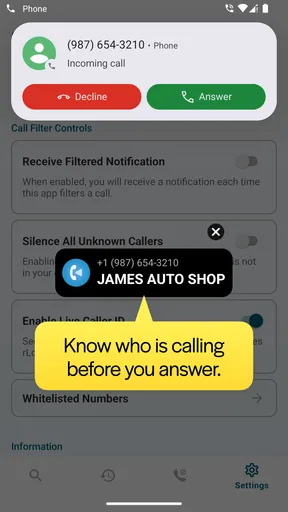
Our Review of Reverse Phone Lookup — rLookup
 Analysis by Appyee
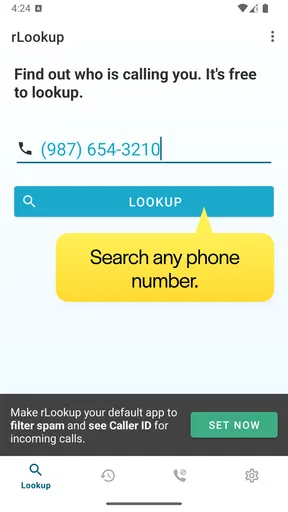
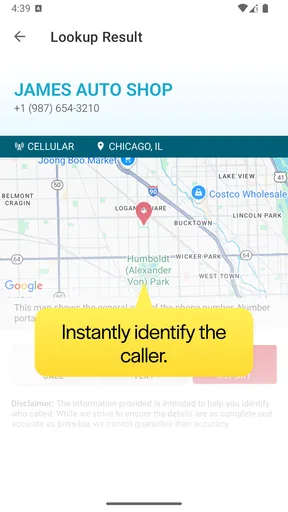
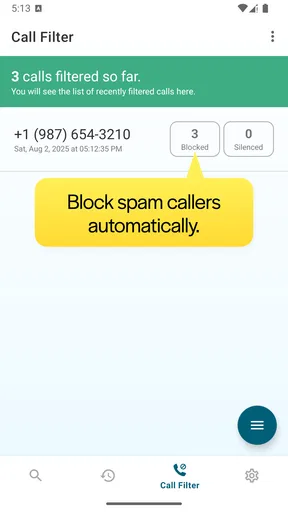
I have always found unknown calls more disruptive than they should be. A number appears, I pause whatever I am doing, and then I have to decide whether answering is worth the risk of a sales pitch or a scam. Reverse Phone Lookup — rLookup takes a focused approach to that problem: it helps identify incoming callers and gives me a way to block numbers that I do not want reaching me again.
That makes it a communication app rather than a full messaging or calling replacement. It does not try to become my address book, dialer, or chat platform. Its value is narrower and more practical: give me useful context around a phone number, then help me reduce repeat interruptions. The app is free to install, has an Everyone age rating, and comes from Wios. With a 4.0 average from around 4.1 thousand ratings and more than 100 thousand installs, it has attracted a modest but meaningful user base.
How I use rLookup in everyday call screening
When I screen an unfamiliar call, I try to decide what I need to know before opening a lookup: whether to answer, return it, or leave it alone. That keeps the check focused and makes an unclear result easier to handle without guessing. I also keep voicemail and the phone’s own call controls in the workflow, since the next useful step is checking whether a setup snag is getting in the way.
The basic workflow is deliberately simple
My normal routine starts with an incoming call from a number I do not recognize. Instead of calling back immediately, I use rLookup as a checkpoint. The point is not to assume that every unfamiliar number is dangerous; it is to gather enough information to make a calmer decision. If the result looks familiar or relevant, I can respond. If it looks like an unwanted caller, blocking becomes the sensible next step.
This small pause is where the app earns its place. A reverse lookup tool is most useful before I commit to a conversation, not after I have already spent several minutes listening to someone explain an offer I never requested. I also find it useful when a number calls repeatedly but never leaves a clear message. Repeated contact alone is not proof of spam, yet it is a good reason to investigate rather than keep answering blindly.
The experience suits people who receive calls from customers, delivery services, schools, clinics, tradespeople, or unfamiliar local businesses. Those users often need to distinguish an important call from an interruption. It is less useful for someone who rarely receives phone calls or already has a dependable screening system built into their phone.
What the lookup can and cannot tell me
I treat the result as a clue, not as a final verdict. Phone-number databases can be incomplete, outdated, or unclear about numbers that have recently changed hands. A number may belong to a legitimate person today even if an older record connects it with something else. Likewise, a caller can hide behind a number that appears ordinary. Identification should support judgment, not replace it.
That mindset prevents one of the easiest mistakes with this kind of app: assuming that a label automatically proves intent. I still avoid sharing personal information, payment details, or verification codes with an unexpected caller. rLookup helps me decide whether a call deserves attention, but it cannot make a suspicious conversation safe by itself.
A realistic situation where it helps
Imagine waiting for a delivery while working from home. A call arrives from an unfamiliar number, and ignoring it could delay the order. I can check the number before answering, then decide whether the context makes sense. If the call is unrelated and continues later, blocking it keeps the same nuisance from becoming a daily interruption.
Another useful situation is a phone shared with a less technical family member. Rather than asking them to investigate every number through scattered web searches, I can show them one repeatable habit: check first, answer carefully, and block only when the pattern is clear. The benefit is not just the lookup itself; it is creating a consistent response to uncertain calls.
Settings and habits worth checking
Because rLookup has a focused purpose, I would begin by checking how it fits alongside the phone’s existing call tools. The built-in phone app may already offer blocking, spam warnings, or caller information. I do not see rLookup as a reason to abandon those tools. Instead, I use the system features for immediate control and the lookup app when I want additional context around a number.
This combination is more practical than trying to make one app handle every part of call management. The phone’s own blocking function is usually the fastest response when a nuisance call is active. rLookup is better placed in the investigation step: understanding what I am looking at before deciding whether the number deserves a permanent block.
I also recommend checking the app’s current behavior after installation rather than assuming every call will be handled automatically. The store summary presents it as a tool for viewing incoming Caller ID and blocking spam callers, but the exact way it works can depend on the phone and operating system. On Android devices running at least version 6.0, I would pay attention to any prompts shown during setup and make sure the app is working in the way I expect before relying on it for important calls.
That is an important practical distinction. A lookup app can be valuable without being completely automatic. If I need to open it manually for some numbers, I want to know that before I start ignoring unfamiliar calls. My safest habit is to let unknown calls go to voicemail when possible, then investigate the number afterward. That gives me time to compare the caller’s claim with the information I already have.
Use blocking as a deliberate action
Blocking is convenient, but I try not to use it as a reflex. A legitimate caller can appear unfamiliar, especially when a business uses different outgoing numbers or when a contact is calling from a temporary line. Before blocking, I consider whether I am expecting a service call, whether the caller left a coherent message, and whether the number has contacted me repeatedly without explanation.
Once the pattern is clearly unwanted, blocking becomes more useful. It turns the app from a passive identification tool into part of a repeatable cleanup routine. I review recent unknown callers, investigate the ones that matter, and remove obvious nuisances from future interruptions. That is a better workflow than searching random numbers only after frustration has already built up.
Faster patterns for experienced users
The quickest approach I found is to separate calls into three groups: expected, uncertain, and clearly unwanted. Expected numbers do not need investigation. Uncertain numbers get a lookup and, if necessary, a voicemail check. Clearly unwanted numbers are blocked without spending extra time trying to understand every detail. This simple sorting method keeps rLookup from becoming another source of delay.
I also avoid looking up every number repeatedly. If I have already identified a caller and made a decision, I keep that decision in mind and move on. The app is most valuable when it answers a real question, such as “Should I return this call?” or “Why does this number keep contacting me?” Searching without a decision in mind can turn a useful utility into a time sink.
A second efficient habit is to investigate in batches rather than interrupting every task. When several unknown calls arrive during a busy period, I let the phone handle the immediate alert, then review the numbers together. This works especially well for people who receive many calls during work hours. It keeps the lookup process from repeatedly breaking concentration.
For families, I would establish a shared rule: never return an unfamiliar call solely because the number looks local. Check it, listen for a meaningful message, and use a known official number when contacting a bank, delivery company, clinic, or public service. rLookup can help with the first check, while the second step protects against callers who imitate legitimate organizations.
Where the app is stronger than ordinary web searching
Searching a number through a general search engine can sometimes produce useful results, but it is inconsistent. Results may be buried under unrelated pages, copied across questionable sites, or difficult to interpret. A dedicated reverse lookup app gives the task a clearer home and pairs the identification step with call blocking.
That pairing is the main advantage over a casual web search. I do not have to jump between a browser result and the phone’s call controls every time I investigate a nuisance number. The app is also more focused than a broad caller-ID service that tries to add many communication features I may never use.
However, a built-in phone spam filter may still be the better choice for someone who wants the least possible interaction. System-level tools can be more convenient when they automatically warn about suspicious calls or manage blocking in the background. rLookup makes more sense for users who want to inspect numbers themselves and keep a hands-on role in the decision.
Important limits before relying on it
The first limitation is the nature of reverse lookup itself. Not every number will have a clear identity, and a result may not provide enough confidence to justify answering. Private mobile numbers, newly assigned numbers, and spoofed caller IDs can all weaken the usefulness of a lookup. I would never treat an apparently clean result as proof that the caller is trustworthy.
The second limitation is coverage of the blocking experience. Blocking a number may stop that particular number, but determined spammers can change numbers. That means rLookup is not a complete solution for persistent campaigns. It works best as one layer in a broader routine that includes voicemail, cautious call-back behavior, and the phone’s own spam controls.
There is also a trade-off between convenience and attention. The more carefully I investigate calls, the more time I spend managing them. People who receive only occasional unknown calls may find that opening a separate app is unnecessary. In that case, the built-in phone tools and a strict “let unknown calls go to voicemail” rule may be enough.
The app is free, which makes trying that workflow low risk, although in-app purchases are listed at $3.99 per item. I would check what any optional purchase changes before paying, especially if the basic lookup and blocking routine already meets my needs. The free starting point is useful because it lets me judge the app against my actual call volume rather than committing based on the idea of better protection.
Compatibility and day-to-day expectations
rLookup supports Android devices from version 6.0 onward, so its stated compatibility reaches a wide range of phones. Still, age alone does not guarantee identical behavior across devices. Phone manufacturers can change how caller identification, background activity, notifications, and blocking work. I would test it with a harmless unknown number first instead of waiting for an important call to discover a setup problem.
The current version is 1.3.6, and the app was released on April 9, 2022. Those details matter mainly as context for expectations: this is a focused utility with an established presence, not something I would choose because it promises to replace every communication feature on my phone. I judge it by whether it makes call decisions clearer and blocking less tedious.
The Everyone rating also makes it approachable for general household use. Even so, younger users should understand that caller information can be wrong and that no lookup result should encourage them to disclose private information. The safest lesson remains behavioral: unknown callers deserve caution, even when an app displays a name or category.
Who should use it, and who should skip it
I recommend rLookup to people who regularly receive calls from unfamiliar numbers and want more control than a basic call log provides. It is particularly suitable for freelancers, small-business owners, parents managing a family phone, and anyone who frequently has to decide whether an unexpected call is worth answering.
I would skip it if my main requirement is completely automatic protection with no manual checking. A phone’s integrated spam screening may be a better fit in that case. I would also look elsewhere if I need a full communication suite, detailed contact management, or a guaranteed identity for every caller. rLookup’s strength is its narrow purpose, and that same narrowness is why it will not satisfy every phone user.
My verdict after building a repeatable routine
After using it as part of a careful call-screening habit, I see rLookup as a practical companion rather than a magic shield. Its best contribution is helping me slow down at the right moment: investigate an unfamiliar number, decide whether the call makes sense, and block it when the pattern is clearly unwanted. That is simple, but it addresses a real daily annoyance.
The app works best when I combine it with voicemail, the phone’s own call controls, and sensible skepticism. Experienced users will get more from it by checking settings, testing the workflow before depending on it, grouping calls by urgency, and avoiding repeated lookups that do not lead to a decision. Those habits make the focused feature set feel more useful.
My final recommendation is positive for anyone who wants a free, straightforward reverse phone lookup tool and is comfortable making the final call themselves. I would not rely on it as the only defense against scams, and I would not install it expecting every unknown number to be identified perfectly. Used with realistic expectations, though, rLookup is a sensible way to turn unfamiliar calls into informed choices instead of automatic interruptions.
Verdict
Strengths of Reverse Phone Lookup — rLookup
- Quickly identifies potential callers using a phone number search.
- Simple interface makes basic lookups easy for first-time users.
- Can help recognize spam, telemarketing, or suspicious calls.
- Useful for checking unfamiliar numbers before returning a call.
- Search results may include caller names, locations, or related details.
Limitations of Reverse Phone Lookup — rLookup
- Results can be incomplete or outdated for mobile and private numbers.
- Some features or detailed reports may require payment or a subscription.
- Accuracy depends on the availability of public and user-submitted data.
- Repeated searches may be limited by quotas, ads, or account requirements.
- Handling phone numbers requires careful attention to privacy and data policies.
Similar Picks in This Category
View All
Google Messages
Google LLC4.6

Gmail
Google LLC4.1

Google Meet
Google LLC4.4

Google Chrome
Google LLC4.1

WhatsApp Messenger
WhatsApp LLC4.6

Carrier Services
Google LLC4.2
Frequently Asked Questions
What is Reverse Phone Lookup — rLookup used for?
Reverse Phone Lookup — rLookup is designed to help you investigate unfamiliar phone numbers. After entering a number, the app may provide available information such as a possible caller name, location, carrier, or user-submitted reports. It can be useful for identifying suspected spam, telemarketing calls, or unknown contacts, although results depend on the number, country, and information available in its databases.
Can Reverse Phone Lookup — rLookup identify every phone number accurately?
No reverse lookup service can guarantee accurate results for every number. Mobile phones, recently assigned numbers, private listings, VoIP lines, and numbers from other countries may return limited or outdated information. During testing, users should treat the displayed details as a helpful reference rather than confirmed proof of identity, and verify important information through another trusted source before taking action.
Is Reverse Phone Lookup — rLookup free to download and use?
The app may be available to download at no initial cost, but some searches, advanced details, unlimited lookups, or additional tools can require in-app purchases or a subscription. Pricing and included features may vary by platform, region, and current app version. Before confirming a payment, review the store listing, subscription terms, renewal conditions, and cancellation instructions carefully.
Does rLookup protect my privacy when I search for a phone number?
Privacy practices can depend on the permissions requested, the information submitted, and the app’s current privacy policy. Avoid entering sensitive personal data unless it is necessary, and check how searches, device information, and account details may be stored or shared. It is also important to remember that lookup results should not be used to harass, impersonate, or expose another person.
Can I use Reverse Phone Lookup — rLookup to block or report spam calls?
The app can help you recognize numbers that have been associated with spam or unwanted calls, especially when community reports or database records are available. However, lookup information does not always block calls automatically. You may need to use your phone’s built-in blocking tools or a carrier feature separately. Never call back suspicious numbers or share passwords, verification codes, or financial details.
